How to get your brand mentioned in AI answers
Last updated 2026-11-01 · by Venu Gopal Reddy Muvva, founder · For: Marketers and founders who already know they are missing from AI answers and want to change it.
To get your brand mentioned in AI answers, find the questions where engines name competitors and not you, see which sources they read and what they praise, then publish a page that answers that question better and is easy for machines to read. BrandInAIAnswers does the finding and the first draft: for every prompt you lose, its action engine writes a content brief, a draft page, JSON-LD schema or an FAQ block, and re-measures after you publish.
Why it matters
AI engines repeat what the pages they read say. If no page clearly connects your brand to the buyer's question, the engine has nothing to quote.
Guessing what to write wastes weeks. The answers themselves tell you who wins, which sources were cited, and what the winners are praised for.
Step by step in BrandInAIAnswers
1. Track the prompts you care about
Add your brand, competitors and buyer questions. After the first run, the dashboard lists the prompts where a competitor is named more often than you.
2. Open the fix plan
In the Action engine, lost prompts are ranked by estimated answers lost per month. Start at the top: that is where one good page changes the most answers.
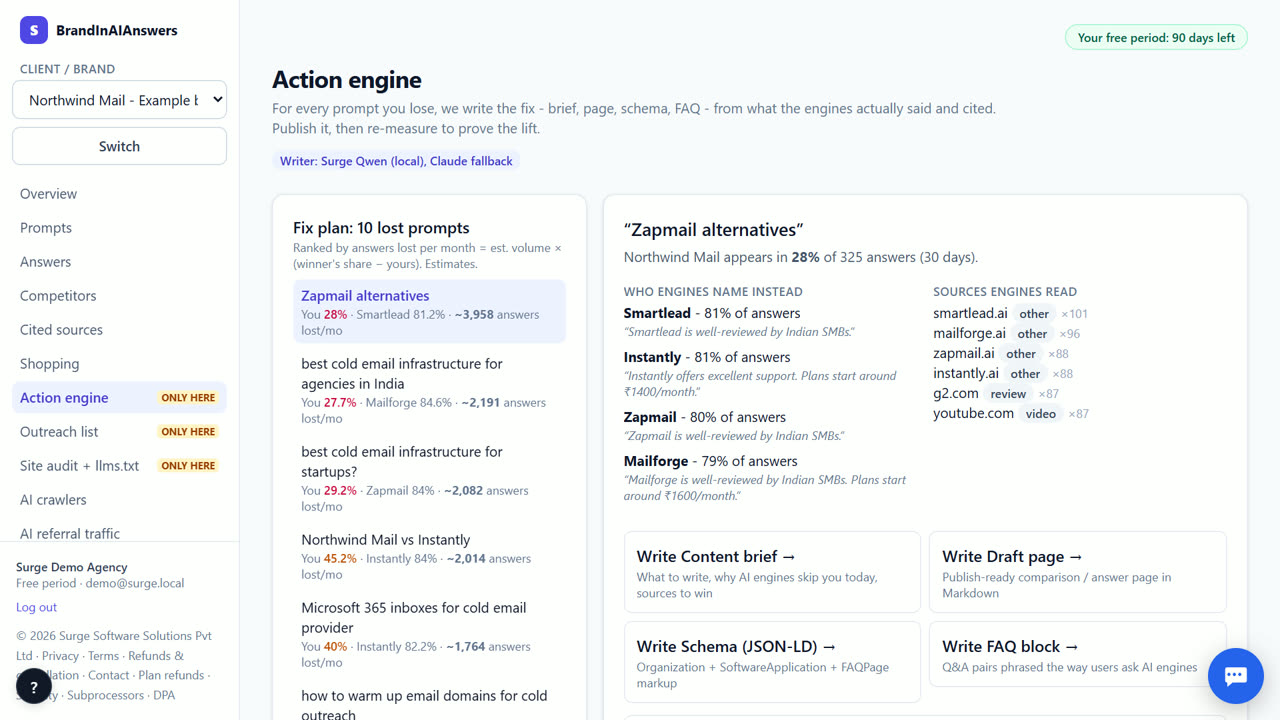
3. Choose what to write
Pick a content brief, a draft page, JSON-LD schema, an FAQ block, or a rewrite of a page you already have. The draft is built from the last 30 days of answers: who wins, what engines say about them, and which sources they cite.
4. Edit and publish on your site
Read the draft, correct anything specific to your business, and publish it on your own site. Copy the schema into the page's code. Then mark the fix as published with its URL.
5. Re-measure
Press Re-measure. Every engine is asked the prompt again with the cache bypassed, and the before and after visibility are saved next to the fix.
What you end up with
A short list of pages to publish, each written for one question you lose, and a before-and-after number for every fix you ship.
Which engines are checked today
Checked live today: Surge AI + web search (Qwen) and Surge AI (Qwen). Coming soon: ChatGPT, Perplexity, Google AI Overviews, Gemini, Google AI Mode, Claude, Grok, Microsoft Copilot, DeepSeek and Meta AI (the app shows labelled sample data until each is connected). Surge AI (Qwen) is our own open model, not ChatGPT or Gemini: without web search it shows what the model knows about your brand; Surge AI + web search answers from open web results (self-hosted search) and cites them.
What it costs
Your first 14 days are free, with every feature unlocked. Our own engines run live; paid engines (ChatGPT, Perplexity and others) are marked coming soon on /pricing and show labelled sample data until each is connected, then their live checks are included with no cap. After that you keep the Free plan for good (1 brand, 10 questions on our own engines) or pick a paid plan from ₹3,999 (about $49) a month; online payment for paid plans opens soon. Our own engines and every fix we write stay at ₹0. See exactly what things cost.
When BrandInAIAnswers is not the right tool
No tool can force an AI engine to mention you. Engines with web search can pick up a new page within days; engines that answer from model memory may take months, until their next training run. If you want someone to write and publish everything for you, a content agency is a better fit; we write drafts, you publish.
Questions
Who writes the drafts?
Our own AI model on the Surge AI server, from your tracking data. Templates are used if the model is busy. Writing fixes costs ₹0, also after the free period.
How soon will I see a change?
Engines with web search can change within days of a page being indexed. Re-measure after a week, then again after a month.
Does it publish for me?
No. You publish on your own site. That keeps you in control of every word.
Try it on your own brand.
Start free — 14 days on us